HubSpot lead triage and AI reply drafts with n8n
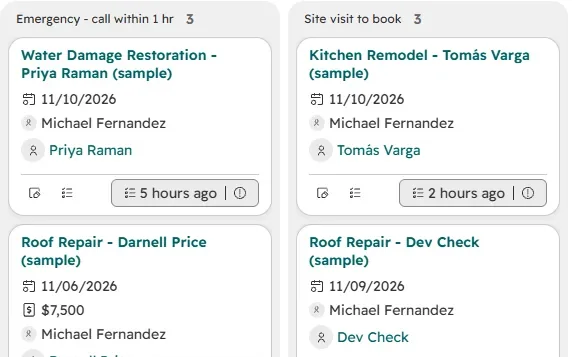
Three n8n workflows on a HubSpot demo portal: new leads become triaged deals with an owner and a call-back task, client emails are logged, and an AI drafts a reply for a person to review.
A GoHighLevel pipeline, calendar and five draft workflows for missed-call text-back, follow-up and appointment reminders, with an offline replay that tests the follow-up rules before anything is sent.
Missed calls and slow follow-up lose leads, and follow-up sequences that keep running after a lead replies or books annoy the people you most want to keep.
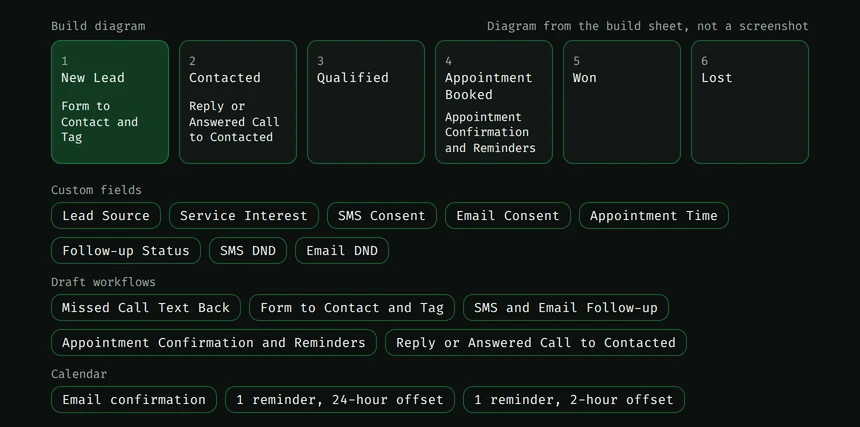
A 6-stage sales pipeline, 8 custom contact fields including consent and do-not-disturb, 6 tags, a booking calendar with reminders at 24 hours and 2 hours, and 5 draft workflows, plus a Python replay of 11 sample events.
This build sets up the follow-up side of a GoHighLevel account in our own demo sub-account: one pipeline from new lead to booked appointment, with rules for when follow-up starts and, more importantly, when it stops.
The five workflows cover:
Consent and do-not-disturb are stored as contact fields.
Sending real texts from a demo account would prove little and risk a lot, so the logic was tested offline. A Python replay feeds 11 sample events through the follow-up rules and records each decision.
The five workflows are saved as drafts and are not published. No SMS, email or call was sent. The replay proves the decisions, not delivery.
Three n8n workflows on a HubSpot demo portal: new leads become triaged deals with an owner and a call-back task, client emails are logged, and an AI drafts a reply for a person to review.
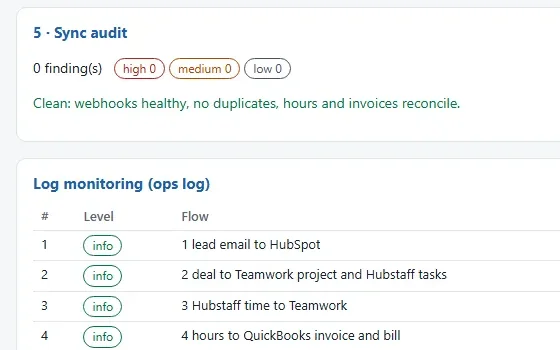
Four n8n workflows that carry a lead from an email into HubSpot, a project tool, a time tracker and a draft invoice, with retries, an error branch, and an audit that finds records the tools disagree on.
Email the founder to arrange a free 45-minute video call. We map your workflow, tools and bottlenecks, and you get a prioritized roadmap.
Michael replies within two business days.