Skip to content
Updated November 26, 2026

AI agents and chatbots

We build AI chatbots and agents for sales and support teams that spend their day answering the same questions and making the same CRM updates.

What you get is an assistant designed like our demos: it answers from your own documents, collects a lead's details, drafts replies or updates CRM records, and hands a conversation to a person when it should.

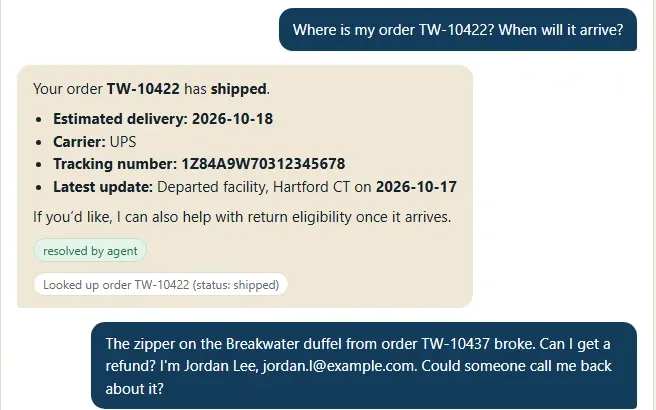
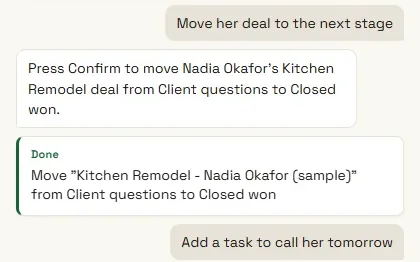
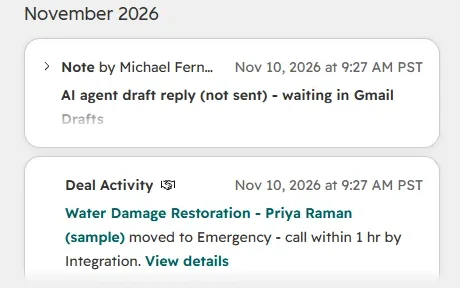
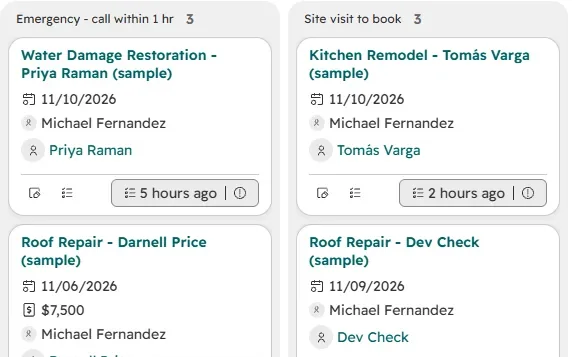
An AI agent is a language model that can use tools: search your documents, look up an order, update a CRM record. Our four demos show the range: a website chat assistant that answers from a knowledge base and books a call, a support agent that hands off to a person, an assistant inside the CRM, and an agent in n8n that works new HubSpot deals and drafts the reply. Each demo page lists its test results and its misses.

Before and after

Before

  • Staff answer the same questions about prices, policies and availability all day.
  • Website visitors ask a question after hours and leave.
  • A salesperson clicks through CRM screens to find out what was said last.
  • Reply emails are written from memory.

After (what the build is designed to do)

  • A visitor asks a question in chat and gets an answer drawn from your knowledge base.
  • The assistant collects the details your team needs and saves each one to the CRM.
  • It books the call or opens the ticket.
  • When a case needs a person, the agent hands it off with the transcript.
  • For staff, an agent reads the contact's history and drafts the reply for a person to send.

What a build covers

A knowledge base

FAQs or help documents the agent answers from.

Tools

Help search, order lookup, refund eligibility, ticket creation, callback booking, CRM reads and writes, Gmail drafts.

Validation

Checked tool inputs, answers that must fit a schema, and a fixed budget of tool rounds.

Human handoff

A handoff that opens a ticket and creates a CRM contact with the transcript attached.

A test set

Scripted questions scored for correct answers, tool choice, handoff decisions and reply language.

A trace

A panel that shows each step the agent took.

Guards

A confirm step before CRM changes, a spend cap, and a filter on which records an agent may work on.

Proof

These are demonstrations on sample and test records. None of them is client work.

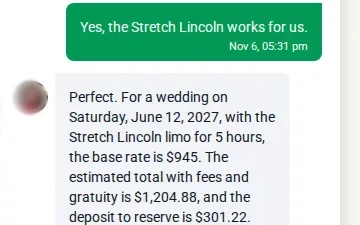
The chat giving a sample estimate with base rate, total and deposit for a wedding booking.

AI quote desk in GoHighLevel Conversation AI

A website chat assistant with a 64-entry knowledge base. On its passing run it answered 5 of 5 knowledge questions and saved 9 of 9 qualifying fields. The three runs before that failed, and the demo page says how.

  • GoHighLevel Conversation AI
  • GoHighLevel knowledge base
  • GoHighLevel calendars

Our approach to testing is written up in how we evaluate an AI automation before it goes live.

For agents working with sales records, see the HubSpot automation and GoHighLevel automation approaches. The AI agent integration cost guide explains how permissions, exceptions and human review affect scope.

Who it is for, and who it is not for

It is a good fit if the same questions come up repeatedly, the right answers are written down somewhere, and a wrong answer can be caught by a person before it does damage.

It is not a fit if the answers live only in someone's head, or if the agent would be making decisions with legal, medical or financial consequences without a person reviewing them.

How we work

  1. 1

    Audit

    We map your current workflow, tools and bottlenecks, and you get a prioritized automation roadmap.
  2. 2

    Build and test

    We build the system in your stack and test it before handoff.
  3. 3

    Deploy and optimize

    The system goes live with reporting and monitoring, and we keep adjusting it.

Risks and how our builds handle them

Invented answers

The support agent answers from retrieved passages and returns a structured answer checked against a schema. Its order data comes from a lookup tool, which in the demo is a mock shop API.

Wrong actions

The side panel agent queues every change behind a confirm, and refuses to move a GoHighLevel opportunity into the stage that starts an automated message sequence.

Messages to real people

The HubSpot agent saves drafts and has no send tool. A guard node limits it to test addresses and one pipeline.

Runaway loops and cost

The support agent has a fixed budget of tool rounds. The side panel agent has a spend cap.

No way to audit

The support agent's chat page has a trace panel, and its handoff attaches the transcript.

Known misses

The support agent's two wrong tool choices are listed on its demo page.

Common questions

What does an AI agent or chatbot cost to build?

We have two fixed-price packages: $2,500 for a single workflow and $5,000 for a full pipeline across several systems. Larger work is quoted after the free audit. For a sense of model usage, five test conversations with our support agent demo cost about two cents.

How long does it take?

The $2,500 package is delivered in two weeks. The $5,000 package includes 30 days of optimization after launch.

Will it make things up?

It can, which is why our demos are built around that risk. The support agent answers from retrieved help-center passages, returns a structured answer that is checked against a schema, and validates tool inputs. In its 30-question test, answers scored 100% and tool choice 93.3%, and the two misses are listed on the demo page.

Can it send emails or change records on its own?

That is a design choice, and our demos show both ends. The HubSpot agent in n8n saves replies as Gmail drafts and has no send tool, but it does set the deal stage and create the follow-up task itself. The CRM side panel agent changes nothing until you press Confirm.

Which AI models do you use?

The demos on this site use OpenAI models, Claude, and GoHighLevel's built-in Conversation AI.

Do the demos use real customer conversations?

No. They run on sample and test records, and none is deployed to production.

Ask for a free automation audit

The audit is a free 45-minute video call. We map the questions and tasks you want handled, and you get a prioritized roadmap afterwards.

Michael replies within two business days.