Skip to content
Updated November 26, 2026

GoHighLevel automation and Conversation AI

This page is for teams already on GoHighLevel that want the account to handle the routine steps: answer a new lead, follow up, book the call, and stop when it should.

Our GoHighLevel builds use the platform's own parts: pipelines, calendars, workflows and the built-in Conversation AI. What you get is those parts set up in your sub-account so they act together, tested before handoff. For the wider picture see CRM automation.

What we build in GoHighLevel

Pipelines and custom fields

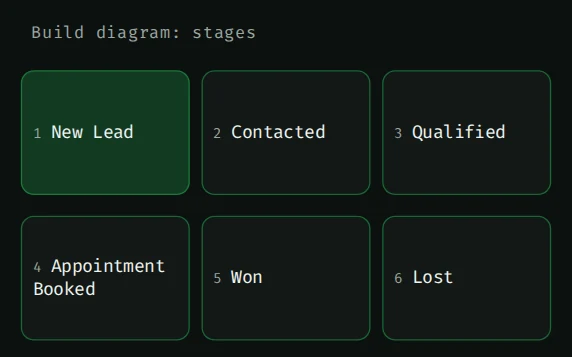
Stages that match your sales process, and fields for what you need to know, including SMS consent, email consent and do-not-disturb.

Workflows

Missed-call text-back, form to contact and tag, SMS and email follow-up, appointment confirmation and reminders, and the rule that moves a lead to Contacted when they reply or answer.

Calendars

Booking calendars tied to the pipeline, with a confirmation and reminders at 24 hours and 2 hours.

Conversation AI bots

A bot with its own knowledge base and actions: save an answer to a contact field, book an appointment, trigger a follow-up workflow, end the chat.

Outside connections

Custom agents that read and write GoHighLevel through its API, such as our CRM side panel agent.

Proof

Demonstrations on sample and test records. None is client work. The first two were built in our own demo sub-account.

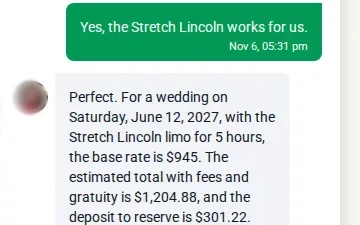
The chat giving a sample estimate with base rate, total and deposit for a wedding booking.

AI quote desk in GoHighLevel Conversation AI

One bot with 14 actions, a 64-entry knowledge base, 9 qualifying fields, a booking calendar, a 4-stage pipeline and 2 workflows.

  • GoHighLevel Conversation AI
  • GoHighLevel knowledge base
  • GoHighLevel calendars

What we have learned building on it

These notes come from our own demo builds.

01

Bundled questions lose answers

In our quote desk demo, the run where the bot bundled several questions into one message saved only 5 of 9 fields. The passing run saved 9 of 9.
02

Prices belong in the knowledge base, checked by a test

One test run of the same bot quoted the wrong estimate. It was corrected before the passing run, which matched the rate card. We would not launch a quoting bot without that check.
03

Some stage moves send messages

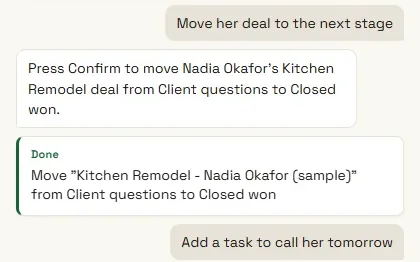
If a workflow is triggered by a pipeline stage, moving a card into that stage contacts a real person. Our CRM side panel agent refuses to make that move for exactly this reason.
04

Build workflows as drafts and test the logic separately

In our follow-up demo, all five workflows were saved as drafts with no trigger attached, and the follow-up rules were tested with an offline replay of 11 events that sent nothing.
05

Texting needs a registered sender

In our follow-up demo no text was sent, because sender registration for business texting had not been done. Check this at the start.

Before publishing a bot or follow-up workflow, use the AI appointment-setting production checklist to test consent, failed runs and the point where a person takes over.

When GoHighLevel is not the right place to build

If the workflow mostly lives outside the CRM, for example moving data between a project tool, a time tracker and an accounting system, build it in n8n and let it update GoHighLevel at the edges. If you are on HubSpot, see HubSpot automation.

Common questions

Do you work inside our existing GoHighLevel account?

Yes. We build in your stack. On an account that already had live workflows, our practice was to back up the objects we touched and leave the published workflows alone.

Can the Conversation AI bot reply by SMS as well as website chat?

Our public demo replies in website chat only, and we say so on its page. SMS needs a registered business sender on your account.

Do you use GoHighLevel yourselves?

Yes. Our call booking calendar ran on GoHighLevel.

Should we use GoHighLevel's built-in AI or a custom agent?

Start with the built-in Conversation AI if the job is answering questions, collecting details and booking. It keeps everything in one place. A custom agent makes sense when the assistant has to use systems outside GoHighLevel.

Ask for a free automation audit

Share your GoHighLevel screen on a free 45-minute video call. We will look at your pipelines and workflows and tell you what we would change first.

Michael replies within two business days.