Before an AI appointment-setting workflow goes live, test more than whether a conversation sounds helpful. Check consent, whether a repeated lead creates duplicate work, whether the calendar really holds the chosen time, what happens when the AI or an outside service fails, and who takes over. Our two GoHighLevel demos show useful test cases, but neither proves live message delivery or a production release.
Name the owner and the allowed actions. Write down who approves the release, who can pause sending, and who handles an escalated conversation. Separate answer generation, CRM writes, booking and outbound messages. Decide which actions can run automatically and which need a person. A useful release record names the person, the action and the stop condition; our demos do not establish these owners for your business.
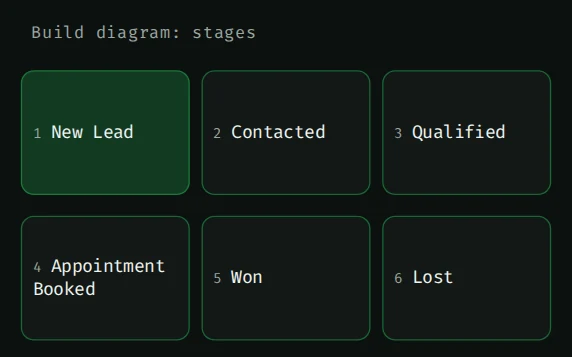
Map each state and its stop rule. List New Lead, Contacted, Qualified, Appointment Booked and closed states in the actual pipeline. For each transition, state what event causes it and what follow-up must stop. Our follow-up demo has a six-stage pipeline; a reply or answered call moves a lead to Contacted. Test a booking, a reply, an opt-out and a do-not-disturb change against any pending sequence. A lead should not receive a booking prompt after booking.
Check consent before every send. Record separate SMS and email consent and do-not-disturb fields, as the follow-up demo does. Test a contact who has consent for one channel but not the other, then withdraw it during a sequence. Keep every test recipient under your control until sending and suppression work. The demo's five workflows were drafts, no sender registration was completed, and no external message was sent.
Make a repeat harmless. Replay the same event id, a second form submission and a manual retry. Check that each leaves one contact, one active appointment and one intended follow-up path. Our offline follow-up replay rejected a repeated event id among 11 sample events. That proves the replay's decision, not how an attached live trigger or CRM write behaves. Test those separately before release.
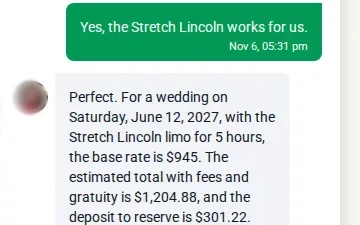
Test every AI output against saved records. Use an agreed question set with the expected answer, required fields and booking result. In the quote desk demo, the fourth test run answered 5 of 5 knowledge questions, saved 9 of 9 qualifying fields, matched the sample rate card and confirmed the call. Three earlier runs failed: a missing vehicle field, a wrong estimate, and bundled questions that saved only 5 of 9 fields. Reject or flag an uncertain estimate or incomplete contact instead of treating a plausible reply as a pass.
Break the path on purpose. Test unavailable calendar slots, a CRM write error, a message delivery failure, a model timeout and an interrupted conversation. For each, decide whether to retry, stop or ask a person. Keep an error record with the lead's current state and the next action, while limiting who can read that record. These are production test cases to run; the two demos do not record results for these failures.
Escalate with enough context. Hand a person the question, transcript or short summary, saved contact fields, consent status, proposed appointment time and the reason for handoff. Trigger review when a visitor asks for a person, a required field is missing, the estimate cannot be checked, or the system cannot confirm a booking. Confirm that the operator can resume without sending a second prompt. The quote desk's failed runs supply concrete cases for this check; its page does not claim an automated human handoff.
Prove the booking and reminders, then release gradually. Verify the selected slot in the calendar and the Appointment Booked state, then test the confirmation and reminders to your own contact. The follow-up demo built a booking calendar with 24-hour and 2-hour reminders, but its replay sent zero messages and did not prove delivery. Start with a small set you can review, keep an immediate pause control, and inspect errors, duplicate events and escalations before widening. Record the observed results and the person who approved each increase.
The follow-up build contains five draft workflows, a calendar and an 11-event offline replay. No SMS, email or call was sent, and its workflows have no published triggers. The quote desk passed its fourth test chat with a fictional brand and sample rate card. Its bot replies in website chat only; SMS and email replies from the bot are not built. Neither demo is a tested production appointment-setting deployment.
Reviewed on 2026-11-26 against the published demo descriptions and their stated test limits: