Skip to content

How to take a web form lead to a qualified, booked call in GoHighLevel

Published November 15, 2026

To take a web form lead to a booked call in GoHighLevel: capture consent on the form, create the contact and tag it when the form is submitted, label the lead Hot, Warm or Not Relevant, send a booking link by text or email, stop follow-up as soon as the lead replies or books, and remind them before the call. Test the rules offline before anything is sent.

This recipe combines two of our demonstrations: a GoHighLevel follow-up and booking pipeline and a contact form AI lead qualifier in n8n. Both run on sample records and are not client work. They are separate builds, and we have not connected them to each other. We say so again where it matters.

What you need first

  • A GoHighLevel sub-account with a calendar and a pipeline.
  • A form that asks for a name, an email address, a phone number and consent to be texted and emailed.
  • If you will text US leads from a standard local number, a registered sender. See step 3.
  • Optional: an n8n instance and a model account if you want an AI label on each lead.

The steps

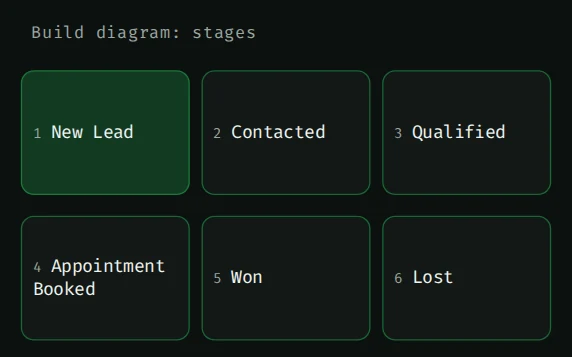
  1. Build the pipeline and the fields. Our demo uses six stages: New Lead, Contacted, Qualified, Appointment Booked, Won and Lost. It adds 8 custom contact fields (lead source, service interest, SMS consent, email consent, appointment time, follow-up status, SMS do-not-disturb and email do-not-disturb) and 6 tags. The consent and do-not-disturb fields are the important ones: every send rule reads them.
  2. Connect the calendar. Create the booking calendar and connect Google Calendar so booked times block each other. HighLevel's help page describes two-way sync and conflict calendars to avoid double bookings. In our demo the calendar sends an email confirmation and reminders at 24 hours and 2 hours before the call.
  3. Settle sending before you build sending. HighLevel's help page says campaign registration is required, after brand registration is approved, to send texts from standard 10-digit local numbers in the United States. It also asks which consent method you use and how contacts opt in. In our demo, sender registration is documented but not done, which is why no text was sent.
  4. Create the form and its first workflow. HighLevel's workflows start from a trigger, and Form submitted is one of the triggers its help page lists. Our demo's second workflow (3 steps) turns a form submission into a contact with a tag. The web lead form itself still has to be created in the GoHighLevel editor, and our demo did not do that.
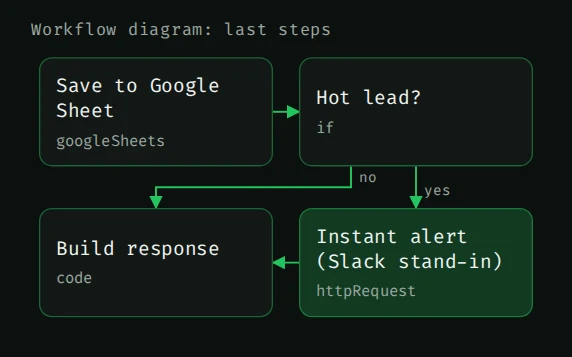
  5. Qualify the lead. In our n8n qualifier, the form or a webhook feeds a cleanup step, then a Claude classification step returns one of three labels (Hot, Warm or Not Relevant), a one-line reason, the service the person wants and how urgent it sounds. A parser enforces the three labels: anything else is filed as Warm with a note asking a person to check, so the lead is kept and not promoted. The workflow has 10 nodes. It writes every lead to a Google Sheet and sends an alert for Hot leads only.
  6. Hand the label to GoHighLevel. This step is a design, not a tested build. The n8n workflow would write the label, reason and service interest to the contact (a custom field or a tag) and move Hot leads to Qualified. In our demo the qualifier wrote to a Google Sheet and alerted a chat channel standing in for Slack, and the GoHighLevel build used synthetic contacts. No run passed a lead from one to the other.
  7. Send the booking link. Two options in GoHighLevel. A workflow action can generate a one-time booking link, which HighLevel describes as a unique scheduling link that expires once used. Or Conversation AI can offer times and book on your calendar from a text conversation, and its help page says the bot can be paused after a booking or can trigger workflows. HighLevel also has outbound Conversation AI agents that start a text conversation from a form submission, with working hours that hold a first message until the next allowed window. Our demo used neither. Its follow-up workflow is a 17-step SMS and email sequence.
  8. Write the stopping rules first. Follow-up should end when the lead replies, answers a call, books, opts out or is marked do-not-disturb. In our demo, a reply or an answered call moves the lead to Contacted, and consent and do-not-disturb are stored on the contact so every send can check them.
  9. Confirm and remind. The calendar sends the confirmation and the 24-hour and 2-hour reminders, and a booked lead should move to the Appointment Booked stage. Our demo built the stage and the reminders. It does not record a test of the stage move.
  10. Replay before you send. Our Python replay fed 11 sample events through the follow-up rules and recorded each decision, with 0 external messages sent and no writes to the live account. An event submitted twice with the same id was rejected as a duplicate. Every test contact used a reserved test email domain and a fictional phone number. The classifier was tested separately: a live run on 8 sample submissions produced 3 Hot, 3 Warm and 2 Not Relevant, and exactly the 3 Hot leads produced an alert.
  11. Then send to yourself. Once a sender is registered, test delivery to your own phone and inbox, then run in approval mode and release gradually. The evaluation checklist sets out that order.

What our demos tested, and what they did not

TestedNot tested
Follow-up rulesAn offline replay of 11 sample events, with 0 messages sentDelivery of any text, email or call
GoHighLevel workflowsFive workflows with their action steps saved in our own demo sub-accountThey are drafts with no triggers attached and are not published
AI labelA live run on 8 dummy leads, with the safe fallback in placeReal leads. The rubric needs a day or two of tuning against examples your team agrees on
DuplicatesA repeated event id is rejected in the GoHighLevel replayThe qualifier has no duplicate check by email and no honeypot or captcha
The two builds togetherNothingNo lead has passed from the n8n qualifier into GoHighLevel

What can go wrong

  • Texting people who did not agree. Store consent on the contact and read it before every send. HighLevel's registration flow asks how contacts opt in, so describe the form you actually use.
  • Follow-up that keeps running. A lead who has replied or booked and still gets the sequence is the failure this design exists to prevent. Test the stop rules with sample events before the send rules.
  • Texts that never arrive. HighLevel's help page ties registration to sending from standard 10-digit US numbers, so confirm registration before you judge a delivery test. A replay cannot show delivery, and ours did not.
  • The AI returns something unexpected. Fix the allowed labels in code and give every other output a safe default, as the qualifier does.
  • The same lead twice. A double submission can be labeled, texted and booked twice. Check for the lead before the AI step, as described in preventing duplicate CRM records.
  • A first message at 2 a.m. HighLevel's outbound agent help page says messages triggered outside working hours are held until the next window, and that several held messages can still all be delivered. Decide what a second form submission should do.
  • Spam. The qualifier demo has no spam protection yet. Add a honeypot or captcha before a public form feeds the workflow.

Sources

Read on 2026-11-15. HighLevel pages show their own modified dates.

Want this set up in your GoHighLevel account? Ask for a free automation audit.

Demos in this guide

Working demonstrations, not client work

Diagram of the 6-stage sales pipeline, from New Lead to Lost, drawn from the build files, not a screenshot.

GoHighLevel lead follow-up and booking pipeline

A GoHighLevel pipeline, calendar and five draft workflows for missed-call text-back, follow-up and appointment reminders, with an offline replay that tests the follow-up rules before anything is sent.

  • GoHighLevel
  • Python
Diagram of the workflow's last steps: a Google Sheets row, the Hot check, and an alert that fires on Hot leads only.

Contact form AI lead qualifier in n8n

A 10-node n8n workflow that reads each website contact form submission, labels it Hot, Warm or Not Relevant with a one-line reason, logs it to Google Sheets and alerts the team on Hot leads only.

  • n8n
  • Claude
  • Google Sheets

Written by

Michael Fernandez

Founder

AI engineer and founder of EasyBot Labs, with a background in bioinformatics.

Common questions

Can GoHighLevel qualify leads by itself?

It can hold the pieces: a pipeline, custom fields, tags and, in its Conversation AI feature, a bot that can talk to a lead and book an appointment on a calendar. Our qualifier demo is a separate n8n workflow that labels each form submission Hot, Warm or Not Relevant with Claude. We have not connected that workflow to GoHighLevel, so the connection in this guide is a design, not a tested result.

Will the lead hear from us within a minute?

We have not measured reply time in either demo. The GoHighLevel demo tested the follow-up decisions offline with 11 sample events and sent no messages, so it shows what would happen, not how fast it arrives.

Do I need to register before texting leads?

For US business texting from a standard 10-digit local number, HighLevel's help page says campaign registration is required after brand registration is approved. Our demo documented this and did not do it, so no text was sent.

How do you stop follow-up after the lead replies or books?

Store the status on the contact and test the stopping rule before the sending rule. In our GoHighLevel demo, a reply or an answered call moves the lead to Contacted, and the replay checks the follow-up decisions against sample events.

Start with a free automation audit

Email the founder to arrange a free 45-minute video call. We map your workflow, tools and bottlenecks, and you get a prioritized roadmap.

Michael replies within two business days.