Skip to content
Updated November 26, 2026

CRM automation for GoHighLevel and HubSpot

When follow-up depends on someone noticing a new lead, some leads wait and some are never answered.

We build CRM automation in GoHighLevel and HubSpot for businesses that need faster follow-up: pipelines, fields, routing rules, follow-up workflows, booking calendars and reminders, built in your stack. The demos below show each of those pieces on sample records, with the logic tested before any message is sent.

Before and after

Before

  • A form submission lands in an inbox and waits for someone to see it.
  • Missed calls are returned when there is time.
  • Follow-up depends on who remembers.
  • Sequences keep messaging people who already replied or booked.
  • The same person exists three times in the CRM.

After (what the build is designed to do)

  • A new lead becomes a contact and a deal or opportunity in the right stage, with an owner and a task.
  • A missed call starts a text-back workflow.
  • Follow-up runs on a schedule and stops when the lead replies or books.
  • Booked appointments get a confirmation and reminders at 24 hours and 2 hours.
  • A repeat submission is recognized, so one person stays one record.
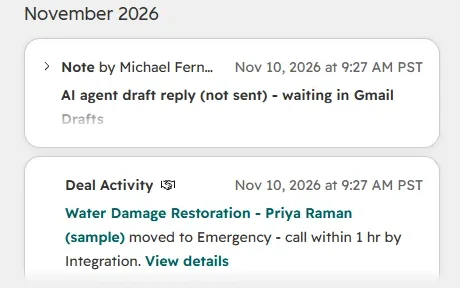
  • Where a reply needs writing, an AI drafts it and creates a task. A person sends it.

What a build covers

Pipeline and fields

Stages for the sales process, and custom fields for lead source, service interest, consent and do-not-disturb.

Lead routing

Rules that set the stage, the owner and the first task for a new lead.

Follow-up workflows

Missed-call text-back, form to contact and tag, SMS and email follow-up, appointment confirmation and reminders, and the rule that moves a lead to Contacted when they reply or answer.

Booking and reminders

A calendar with an email confirmation and reminders at 24 hours and 2 hours.

Duplicate handling

A repeat lead returns the existing deal; a repeated event with the same id is rejected.

AI reply drafts

Written from the contact's thread and deal, saved with a review task. See AI agents and chatbots.

Proof

These are demonstrations on sample and test records. None of them is client work.

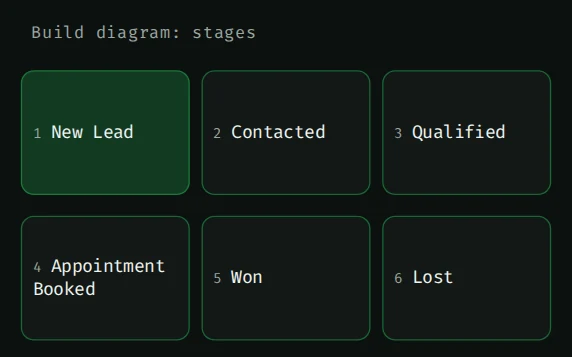
Diagram of the 6-stage sales pipeline, from New Lead to Lost, drawn from the build files, not a screenshot.

GoHighLevel lead follow-up and booking pipeline

A 6-stage pipeline, 8 custom fields including consent and do-not-disturb, a calendar with two reminders, and 5 draft workflows. An offline replay of 11 sample events tested the follow-up rules with zero messages sent. The workflows are drafts and have not been published.

  • GoHighLevel
  • Python
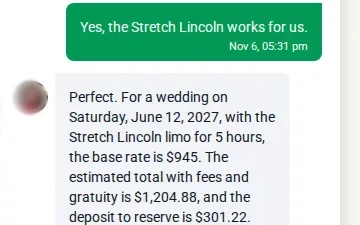
The chat giving a sample estimate with base rate, total and deposit for a wedding booking.

AI quote desk in GoHighLevel Conversation AI

A chat assistant that saved nine qualifying details to contact fields and moved the opportunity to Booked.

  • GoHighLevel Conversation AI
  • GoHighLevel knowledge base
  • GoHighLevel calendars

More detail on each platform: GoHighLevel automation and HubSpot automation.

Choosing a CRM for follow-up? Read the GoHighLevel vs HubSpot comparison. For implementation details, see the GoHighLevel form-to-booked-call walkthrough and the duplicate CRM record checks.

Who it is for, and who it is not for

It is a good fit if you already use GoHighLevel or HubSpot, or have decided to, and leads are slipping because follow-up is manual.

It is not a fit if you need a custom-built CRM, or if nobody on your team will own the pipeline once it is running. Automation makes a working sales process faster. It does not create one.

How we work

  1. 1

    Audit

    We map your current workflow, tools and bottlenecks, and you get a prioritized automation roadmap.
  2. 2

    Build and test

    We build the system in your stack and test it before handoff.
  3. 3

    Deploy and optimize

    The system goes live with reporting and monitoring, and we keep adjusting it.

Risks and how our builds handle them

Messaging the wrong people

In the follow-up demo, consent and do-not-disturb are fields on the contact, and the follow-up logic was exercised by replay with nothing sent.

Duplicate records

In the HubSpot demo a repeat lead returned the same deal. In the follow-up replay a repeated event id was rejected.

Breaking what already works

On an account with live workflows, our practice was to back up the objects we touched and leave published workflows alone.

Stage moves that fire messages

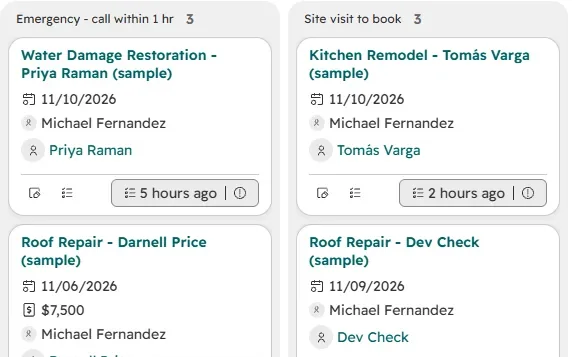
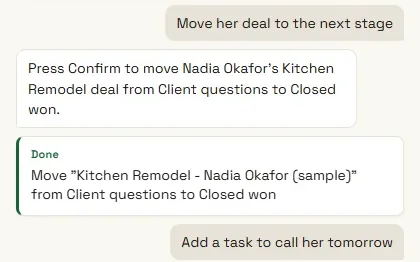
In the GoHighLevel pipeline our side panel agent was tested on, one stage starts an automated message sequence. The agent refuses to move an opportunity into it.

AI replies going out unread

In the HubSpot demo the AI writes a draft and creates a review task. It does not send.

Texting that never arrives

Business texting needs a registered sender. In the follow-up demo that registration had not been done, so no text was sent, and the demo page says so.

Common questions

What does CRM automation cost?

We have two fixed-price packages: $2,500 for a single workflow and $5,000 for a full pipeline across several systems. Larger work is quoted after the free audit.

How long does it take?

The $2,500 package is delivered in two weeks. The $5,000 package includes 30 days of optimization after launch. If the build includes business texting, check early whether your account has a registered sender; in our own follow-up demo no text was sent because that registration had not been done.

Do we have to switch CRMs?

No. We build in your stack. Our demos are in GoHighLevel and HubSpot.

Will it text or email people while it is being built?

In our follow-up demo the workflows were saved as drafts with no trigger attached, the logic was tested by an offline replay, and zero messages were sent. That is how we approach a build.

What happens to workflows we already have?

On an account that already had live workflows, our practice was to back up the objects we touched and leave the published workflows alone.

What do we get at the end?

The $2,500 package includes handoff documentation. The $5,000 package adds monitoring and alerts and 30 days of optimization.

Ask for a free automation audit

The audit is a free 45-minute video call. We map how a lead moves through your CRM today, and you get a prioritized roadmap afterwards.

Michael replies within two business days.