For a small service business that mainly wants new leads answered by text and email, booked on a calendar and chased until they reply, GoHighLevel's $97 a month Starter plan covers more of that natively than HubSpot's Sales Hub. HubSpot fits better when you want a CRM first and a person following up, and can budget per seat: Professional lists $90 per seat per month plus a $1,500 onboarding fee. Prices read 2026-11-15.
A note on where this comes from. Our demos for both platforms run on sample or test records, and the prices below were read from each vendor's own pages on 2026-11-15. We have not built the same follow-up flow in both products, and we have not sent live texts or emails to real leads from either. Where our evidence stops, we say so.
The two at a glance
All prices are in US dollars, read on 2026-11-15 from the pages linked under Sources. Vendors change plans often, so check the pages before you decide.
| GoHighLevel | HubSpot Sales Hub |
|---|
| Entry plan with follow-up automation | Starter, $97 a month, month to month | Starter, $7 per seat per month on the annual option ($20 shown struck through); Professional, $90 per seat per month on the annual option ($100 shown struck through) |
|---|
| Free trial or free tier | 14-day free trial on any plan | Free tools for up to 2 users, no credit card |
|---|
| Who the plan is built for | One business or a few clients: 3 sub-accounts on Starter | Teams of sellers: priced per seat |
|---|
| Contacts and users | Unlimited contacts, unlimited users | Priced per seat |
|---|
| One-time fees | A2P text registration: $22.50 one time on the page's low-volume and sole-proprietor rows | Professional onboarding: $1,500 one time; Enterprise onboarding: $3,500 |
|---|
| Workflow automation | Workflow Builder on Starter | Starter: up to 50 workflows with restricted triggers and actions. Professional: up to 300 fully customizable workflows |
|---|
| Text messages | Two-way SMS on Starter, billed by usage | Not listed on the Sales Hub page we read |
|---|
| Email | Two-way email on Starter, billed by usage | Sequences on Professional: up to 500 email sends per user per day |
|---|
| Booking | Booking calendars in the core features | Meeting links: 1 personal link on Free, up to 1,000 from Starter |
|---|
| Missed-call text-back | Built in, with a workflow recipe | Not listed on the page we read |
|---|
| AI that talks to leads | Conversation AI: usage-based, or AI Employee plans at $50 or $97 a month per sub-account | HubSpot Credits: 500 included on Starter, 3,000 on Professional |
|---|
| Usage-based charges | Texts, calls, emails, AI and premium workflow actions | Credits for AI agents and features |
|---|
Two details matter more than the table suggests:
- GoHighLevel's $97 plan is an agency plan. HighLevel's FAQ says Starter includes 3 sub-accounts. A single business uses one, and the unlimited contacts and users apply to it. You are buying a platform built for agencies, which shows in the interface.
- HubSpot's workflow-triggered sequences are listed under Enterprise. On the Sales Hub page, Professional includes sequences, and the line "ability to trigger sequences" appears only on the Enterprise column ($150 per seat per month plus $3,500 onboarding). We have not tested whether a Professional workflow can enroll a contact in a sequence by another route. If automated follow-up that starts without a person matters to you, ask HubSpot about this before you buy.
What each automates natively
GoHighLevel. On the Starter card, HighLevel lists a Workflow Builder, a Campaign Builder, two-way SMS and two-way email. Its core features list adds CRM and pipelines, booking calendars, forms and unified conversations. Its help centre describes Missed Call Text Back, which texts a caller you did not reach, and recommends a wait step so one caller who rings three times does not get three texts. The conversation bot, Conversation AI, is a usage-billed feature.
What we built on it:
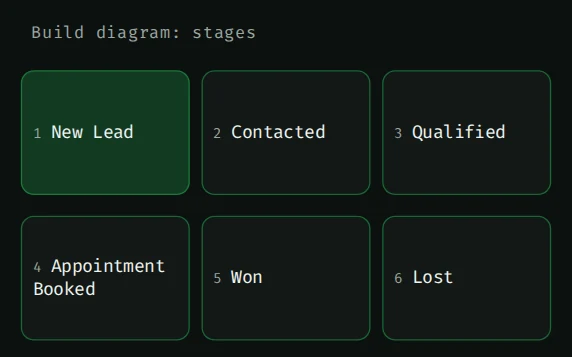
- Our GoHighLevel lead follow-up and booking pipeline is a 6-stage pipeline, a booking calendar with reminders at 24 hours and 2 hours, consent and do-not-disturb fields, and 5 draft workflows including missed-call text-back and a 17-step SMS and email follow-up. An offline replay of 11 sample events tested when follow-up starts and stops. The workflows are drafts, and no text or email was sent.
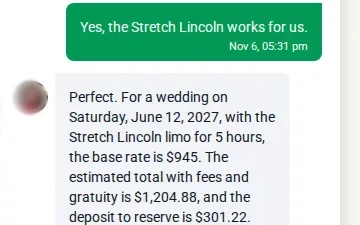
- Our AI quote desk is a website chat bot inside GoHighLevel's Conversation AI with a 64-question knowledge base, nine saved quote fields and a booking calendar. It passed on the fourth test run; the first three failed, for the reasons on its page.
HubSpot. On the Sales Hub page, the follow-up building blocks are workflows, sequences (Professional and up), task queues, meeting links and calling minutes. The CRM itself, with contacts, deals and pipelines, sits under all of them, and Sales Hub has a free tier for up to 2 users.
What we built on it:
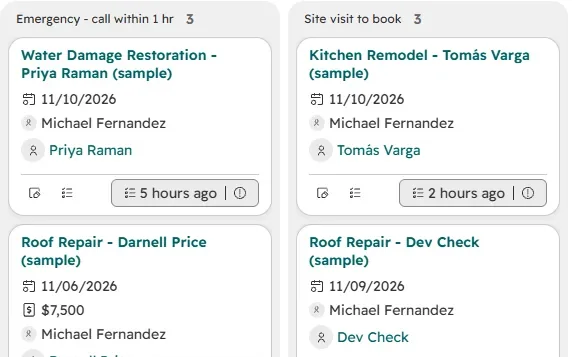
- Our HubSpot lead triage uses n8n to turn a new lead into a contact, deal, stage, owner and call-back task in 1.8 seconds on a HubSpot demo portal, and drafts an AI reply for a person to review. A repeat submission returned the same deal.
- Our n8n AI agent for HubSpot deals reads each new deal's history, saves a Gmail draft, logs it on the timeline and creates a follow-up task. It drafts and never sends.
Notice the pattern: on HubSpot our demos put the logic in n8n, on GoHighLevel they put it in the platform's own workflows and bot. That reflects what we were asked to show, not a measured gap between the products.
Where n8n fills gaps
Both platforms have workflow builders. We reach for n8n when:
- A flow crosses systems. A lead lands in a form, a spreadsheet and the CRM, and something has to decide which wins.
- An AI step needs a guard. In our HubSpot demos the model only writes a draft for a person to approve, and a guard node limits which records the agent may touch.
- Failures need a path. Up to 3 tries per call, an error branch and an ops-log line, as in our lead-to-invoice sync, where a call that failed twice succeeded on the third try.
- The CRM plan lacks a trigger. On our free HubSpot demo portal, a direct trigger for new deals was not available to us, so the agent polls once a minute instead.
n8n's pricing page says it bills by workflow execution regardless of complexity, so a long follow-up flow does not cost more per run than a short one. For the numbers, see our n8n vs Zapier vs custom code guide, which works through 500 leads a month.
What follow-up costs on each, in one example
An illustration, not a quote. Take 500 new leads a month, where each lead gets 5 texts and 5 emails over a week of follow-up, one segment per text.
GoHighLevel, from the platform and phone-pricing pages:
| Line | Arithmetic | Monthly |
|---|
| Starter plan | listed price | $97.00 |
| Outbound texts | 500 x 5 = 2,500 segments x $0.00747 | $18.68 |
| Carrier fees on those texts | 2,500 x $0.0035 to $0.0050 (the page lists $0.0035 to $0.0050 by carrier) | $8.75 to $12.50 |
| Email | 2,500 emails x $0.675 per 1,000 | $1.69 |
| Local phone number | one number | $1.15 |
| Total | | about $127 to $131 |
Not in that total: the monthly A2P campaign fee ($1.50 to $10.50 on the page's low-volume row), the one-time A2P registration, calls, any AI usage, and the $0.01 charge per premium workflow action.
HubSpot Sales Hub Professional, one seat: $90 a month on the annual option, which is $1,080 a year, plus $1,500 of one-time onboarding, so $2,580 in the first year, before any extra seats. Each extra seat adds the same $90. We did not price text messaging on HubSpot because the Sales Hub page does not list it.
What the example shows: GoHighLevel's cost grows with message volume and HubSpot's grows with the number of people who log in. Which is cheaper depends on which of those you have more of.
Which to choose
Choose GoHighLevel if
- the lead comes in by phone, form or chat and the first response should be a text;
- you want missed-call text-back, booking and a CRM in one tool;
- there is one business and one or two people working leads;
- you are comfortable registering for business texting and watching usage charges.
Choose HubSpot if
- a person, not an automation, does most of the follow-up and needs a good CRM to do it;
- you already use HubSpot for marketing or service, so the data is there;
- email sequences and a dashboard for sellers matter more than texting;
- you can budget per seat and the Professional onboarding fee.
Choose HubSpot plus n8n if
- the CRM stays in HubSpot, and you want leads triaged into deals, an owner and a task, and AI-drafted replies that a person reviews.
Whichever you choose, write down what happens when the same lead arrives twice and when someone replies halfway through a sequence. Follow-up that keeps going after a reply or a booking is the failure that costs you the lead. Our guide on duplicate CRM records covers the first of those.
What this guide does not cover
- We have not built the same follow-up flow in both products, and nothing here measures reply or booking rates for either.
- No live texts or emails were sent from our GoHighLevel demos, so we have no deliverability results.
- HubSpot Marketing Hub, Service Hub and Smart CRM plans, and HubSpot's other messaging products, were not read.
- The HubSpot prices above are as the page showed them, with a struck-through higher price beside each. We cannot tell from the page how long the lower price lasts.
- Other CRMs, such as Salesforce or Pipedrive, are not covered. We have not tested them.
- The page says HubSpot onboarding is required for Professional and Enterprise; we did not check whether it can be waived.
Sources
Read on 2026-11-15.
If you want a follow-up flow set up on either platform, see GoHighLevel automation, HubSpot automation or ask for a free automation audit.