Short answer: for routing leads into a CRM with an AI qualification step and proper error handling, we build in n8n. Zapier is a reasonable choice when the route is short and nobody technical will maintain it. Custom code earns its place when the work is really a data pipeline: collecting, cleaning and deduplicating records at volume, with tests.
A note on where this comes from. The demos this guide draws on are built in n8n and in Python, and the numbers below come from them. We have not published a Zapier build, so what we say about Zapier is taken from Zapier's own website, checked on 2026-11-13 and linked at the end. The prices in the worked example were read on 2026-11-15. Vendor plans change often. Check the linked pages before you decide.
What lead routing actually involves
"Send form submissions to the CRM" sounds like one step. A route you can trust has six:
- Intake. Receive the lead from a form, an email, an ad platform or a list.
- Cleanup. Normalize names, emails and phone numbers.
- Duplicate check. Decide whether this person already exists.
- Qualification. Score or label the lead, often with an AI model.
- Write. Create or update the contact and deal, set the stage, assign the owner, create the task.
- Failure handling. Retry what failed, log what could not be fixed, and tell someone.
The tools differ most at steps 3, 4 and 6.
How each one bills
Zapier bills on tasks. Its pricing page says a task is counted whenever Zapier successfully completes a unit of work. Trigger steps, Filter steps and Paths steps do not count, and neither do action steps that error or halt. The same page notes that some actions use more than one task.
n8n Cloud bills on workflow executions. Its pricing page says pricing is based on monthly workflow executions regardless of complexity, and defines an execution as a single run of your entire workflow.
Custom code is not billed by a workflow vendor at all. The cost is where it runs and the person who maintains it.
A worked example makes the difference concrete. Take 500 leads a month, arriving by webhook, through a route with six action steps. By the definitions above, n8n counts 500 executions. Zapier counts up to 3,000 tasks: 500 leads times six successful actions, with any filters and paths free. Add two more steps and n8n still counts 500 while Zapier counts up to 4,000.
That does not make either one cheaper for you. It tells you which number to look up on each pricing page. The next section looks them up.
Worked example: 500 leads a month, priced
The assumptions: 500 leads a month arrive by webhook. Each lead goes through the six-action route above and every action succeeds first time. On Zapier the trigger, filters and paths are free, so each lead uses 6 tasks. On n8n each lead is one run of the workflow, so it uses 1 execution. Prices are in US dollars, read from the vendors' pages on 2026-11-15.
| Counted per lead | Counted at 500 leads | Plan that covers it | Per month, yearly billing | Per month, monthly billing |
|---|
| Zapier, 6 actions per lead | 6 tasks | 500 x 6 = 3,000 tasks | Professional, 5K tasks tier | $89 | $133.50 |
|---|
| Zapier, 2 actions per lead | 2 tasks | 500 x 2 = 1,000 tasks | Professional, 1.5K tasks tier | $39 | $58.50 |
|---|
| n8n Cloud, any number of steps | 1 execution | 500 executions | Starter, 2.5K executions | $20 | $24 |
|---|
| Custom code | none from a workflow vendor | not applicable | hosting and maintenance, not priced here | not priced | not priced |
|---|
The custom code row is not priced here because this example leaves out labour and hosting; the cost depends on who builds and maintains it.
The arithmetic over a year on yearly billing: Zapier at six actions is $89 x 12 = $1,068, at two actions $39 x 12 = $468, and n8n Cloud Starter is $20 x 12 = $240.
How the plan was picked. Zapier's pricing page offers Professional task tiers of 750, 1.5K, 2K, 5K and 10K a month. At yearly billing they cost $19.99, $39, $49, $89 and $129, and at monthly billing $29.99, $58.50, $73.50, $133.50 and $193.50. The smallest tier that holds 3,000 tasks is 5K. The Free plan has 100 tasks and two-step Zaps only, so it does not cover this. Each extra action per lead adds 500 tasks: three actions is 1,500 tasks (the $39 tier, exactly at its limit), four is 2,000 ($49), and five or six is 2,500 to 3,000 ($89). For n8n, the pricing page lists Starter at 2.5K executions with unlimited steps, and Pro at 10K executions for $50 yearly or $60 monthly. Starter has 5 concurrent executions and one shared project.
What the example shows, and does not show:
- At six actions per lead, Zapier's list price is 4.45 times n8n's ($89 against $20). At two actions it is 1.95 times ($39 against $20). The gap comes from the billing unit, not from one tool being better.
- n8n Starter has room for 2,000 more executions. A second workflow that runs once per lead, such as a separate error or retry workflow, would add executions, and even doubling to 1,000 fits Starter. We did not test how n8n counts error workflows, so check that against your design.
- If one of the six actions is an AI step, Zapier counts it by model tier, not as one task, so the Zapier figure can be higher. Zapier's task article says Code by Zapier is one task per run at standard runtime.
- If you pass your plan's task limit, Zapier's help article says you are either charged for extra tasks under pay-per-task billing or your new Zap runs are held until the cycle resets, depending on your plan.
- The prices leave out the person who builds and maintains the route. That cost is higher on n8n unless someone technical owns it, and it is the main cost of custom code. We did not price it, or hosting for self-hosted n8n or custom code.
- The n8n page showed €20 to one fetch and $20 in a browser, depending on location. We used the dollar figures from the browser.
Our recommendation at 500 leads a month: choose n8n Cloud Starter if the route has 4 or more actions or any AI step and someone can own it, choose Zapier Professional if the route has 3 or fewer actions and nobody technical will maintain it, and choose custom code only when the work is a data pipeline more than a route.
Branching, code and error handling
Zapier. Conditional branching is Paths. Custom logic is Code by Zapier, which runs JavaScript or Python inside a Zap. Webhooks are Webhooks by Zapier. For failures there is Autoreplay, which retries task failures caused by temporary errors or downtime, and error notifications that can be set per Zap. On Zapier's pricing page on the date we checked, Code steps were on every plan, while Paths, Webhooks, Autoreplay and custom error notifications were listed on the paid Pro, Team and Enterprise plans.
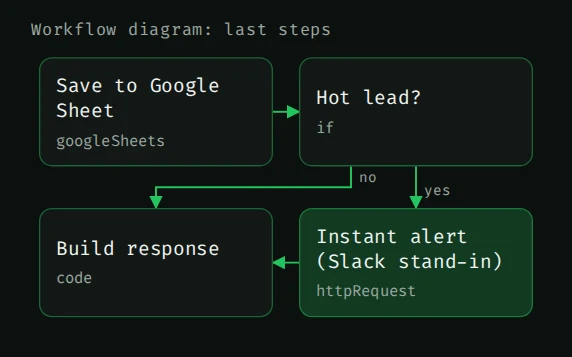
n8n. In our contact form demo, a "Hot lead?" node branches the workflow so that only Hot leads raise an alert. The Code node runs JavaScript or Python as a workflow step. The Webhook node starts a workflow when an app sends data. Each node has a Retry On Fail setting, and an Error Trigger node lets you build a separate error workflow that runs when another workflow fails. There is an AI Agent node that connects a chat model to tools and lets the agent decide which to call. n8n also ships built-in nodes for HubSpot, HighLevel, Google Sheets and Gmail.
Custom code. Everything is possible and nothing is given. You write the retry, the log and the alert yourself. In return you get what our Python pipelines rely on: an automated test suite and full control over how records are matched.
Hosting and data
Zapier describes itself as a cloud-based platform with fully managed cloud infrastructure.
n8n offers a hosted Cloud service, and you can also self-host n8n on your own infrastructure, and its documentation says that without a license key it runs as the free Community edition. Read n8n's license before building on the self-hosted version: it limits use to your own internal business purposes or to non-commercial or personal use.
Self-hosting matters when lead data must stay on infrastructure you control. It also means someone has to keep the server patched and backed up.
In n8n: the routes.
- Our contact form AI lead qualifier is one workflow of 10 nodes. It labels each submission Hot, Warm or Not Relevant, writes every lead to Google Sheets, and alerts on Hot only. In its live run, 8 sample leads produced 3 Hot, 3 Warm and 2 Not Relevant.
- Our HubSpot lead triage workflow is 20 nodes. It turned a lead into a contact, deal, stage, owner and task in 1.8 seconds, and a repeat submission returned the same deal.
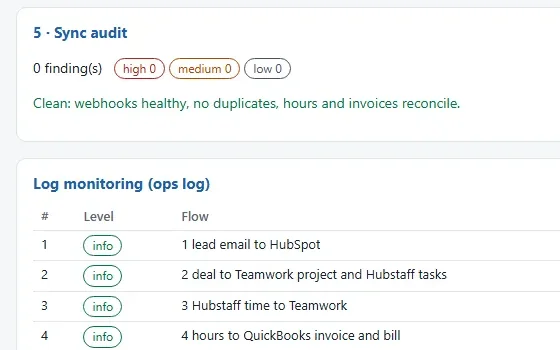
- Our lead-to-invoice sync is four workflows of 37 to 109 nodes each. Its replay passed 8 of 8 scenarios, including a call that failed twice and succeeded on the third try.
We chose n8n for these because each run touches several systems, each call can fail, and the AI step needs a guard written in code. By n8n Cloud's definition, one run of a 109-node workflow would still be one execution.
In Python: the pipelines.
- Our permit-triggered outbound pipeline reads 367 public permits and produces 36 ranked target projects and 323 exclusions that each carry a reason code; its run summary does not account for the other 8 permits.
- Our public-records pipeline merges two sources into 331 deduplicated records, and its test suite finished with 213 passed and 2 skipped.
We chose code for these because the work is batch processing with matching rules, and the only way to trust matching rules is a test suite. A visual workflow tool is the wrong place for that.
Which to choose
Choose Zapier if
- the route is short: a trigger and a few actions;
- nobody on the team is comfortable with APIs;
- volume is low enough that tasks per lead does not matter.
Choose n8n if
- the route has many steps or several branches;
- you want an AI step with its output checked in code;
- failures need a defined path, not just a notification;
- you want the option to self-host.
Choose custom code if
- you are building the list, not just routing it;
- records come in thousands and need deduplication;
- you need automated tests before you trust the output;
- you have, or will hire, someone to maintain it.
Whichever you choose, write down what happens when the same lead arrives twice and what happens when the CRM is down. If nobody can answer those two questions, the tool is not the problem yet.
What this guide does not cover
- We have not built the same route in all three tools. The comparison is ours for n8n and Python, and from Zapier's own pages for Zapier.
- Prices in dollars appear only in the 500-leads example, dated 2026-11-15. We did not price labour, hosting, AI model usage, or Zapier's Next Gen Zaps, and the figures will go stale when either vendor changes its plans.
- Make, and CRM-native workflow tools, are left out.
Sources
Checked on 2026-11-13. The Zapier pricing page, the Zapier task article and the n8n pricing page were read again on 2026-11-15 for the 500-leads example, where the prices and tiers come from.
Choosing a CRM rather than a routing tool? See our GoHighLevel vs HubSpot guide for lead follow-up.
For implementation in each CRM, see GoHighLevel automation and HubSpot automation.
If you want this decision made for your own lead flow, see n8n workflow automation or ask for a free automation audit.