Test an AI automation in five stages before it emails real customers: replay it on past cases with sending off, send only to inboxes you control, run it in approval mode, release it gradually, and keep a kill switch with a named owner. Pass each stage before starting the next. Below, each stage lists what to check, what our demos did, and the public standard it connects to.
These are our working rules, drawn from demonstrations on sample records, test records and public data. They are not a standard, and they are not a guarantee that nothing will go wrong. We have not run this checklist on a client's live automation. Sources were read on 2026-11-15 and are listed at the end. This is not legal advice.
The launch checklist
Stage 1: Replay it with sending turned off
- Do: feed the automation sample or past cases and record what it would send, to whom and when, without sending. Include missing data, a repeated event, an opted-out contact and a case where the model answers badly.
- Pass when: every decision matches your expected result, and a repeated event changes nothing.
- Our evidence: the GoHighLevel follow-up demo replayed 11 sample events with 0 external messages sent. See checks 1 and 3 below.
- Standard: NIST AI RMF, Measure 2.1 asks that test sets, metrics and the tools used are documented. NIST describes the framework as voluntary.
- Not proven by this stage: that a message is delivered.
Stage 2: Send only to inboxes you control
- Do: send real messages to your own addresses and check formatting, links, personalization, reply handling and unsubscribe. Test bounces and complaints with a simulator, not with real recipients.
- Pass when: nothing reaches an address outside your control list, and the message meets the rules for commercial email.
- Our evidence: our HubSpot AI agent demo has a guard node that lets through only sample addresses, one test address of our own and one pipeline. See check 6.
- Standards: the FTC's CAN-SPAM guide for business lists what a commercial message must contain: accurate header information, a subject line that is not deceptive, identification as an ad, your valid physical postal address, a way to opt out, and honoring opt-outs within 10 business days. Amazon SES documents a mailbox simulator: mail sent to it does not count toward your sending quota or your bounce and complaint rates, and its sandbox accounts can use it.
- Not proven by this stage: that recipients you do not control will accept the mail.
Stage 3: Run in approval mode
- Do: let the automation draft real messages, and require a person to approve each recipient and message. Record every correction and fix the repeat ones.
- Pass when: the corrections stop repeating. Set the number before you start.
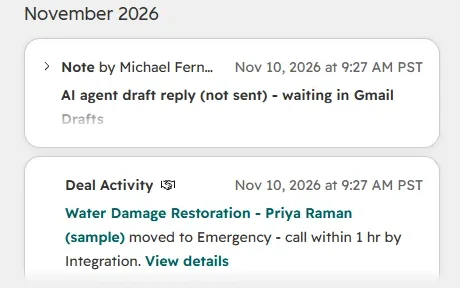
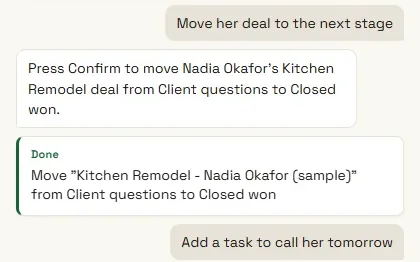
- Our evidence: the HubSpot agent saves replies as Gmail drafts, and the CRM side panel agent queues every change behind a Confirm button. In the HubSpot agent's first test, one draft was attached to an unrelated email thread. It was a draft, so the cost was a fix and a re-run. See check 6.
- Standard: NIST AI RMF, Measure 4.2 and Manage 4.1 cover results informed by domain experts and post-deployment monitoring that includes appeal and override.
Stage 4: Release gradually
- Do: start with a small, low-risk group. Set a daily send limit and a per-contact limit, and watch errors, bounces, opt-outs and complaints before widening.
- Pass when: each step up has had a clean period you chose in advance. Keep a person in the loop for high-impact messages.
- Our evidence: none as a recorded rollout. Our outbound demo prepares its campaign as a paused-draft export and blocks it until a real sender identity and postal address are in place. Our own outbound process starts campaigns paused and uploads only on the owner's word. That is a starting state, not a staged release.
- Standard: Google's sender guidelines say to keep spam rates reported in Postmaster Tools below 0.3% and require marketing messages from senders of more than 5,000 messages a day to Gmail to support one-click unsubscribe. Those thresholds belong to Google, not to us.
Stage 5: Keep a kill switch with an owner
- Do: decide who can stop the automation immediately and how. Cap the tool rounds, cap the spend, keep a trace of every step, and write down what turns it off.
- Pass when: the owner has stopped it once in a drill and nothing went out afterwards.
- Our evidence: limits, not a tested switch. The support agent defaults to 8 tool rounds, the side panel agent stops at $2.50 of model usage, and the side panel agent refuses to move an opportunity into the stage that starts an automated message sequence. See check 7.
- Standard: NIST AI RMF, Manage 2.4 asks for mechanisms, with assigned responsibilities, to supersede, disengage or deactivate AI systems that perform inconsistently with their intended use.
Which rules apply to whom
| Source | What we read in it | Applies when |
|---|
| FTC, CAN-SPAM Act compliance guide for business | Eight requirements for commercial email, including a postal address, an opt-out honored within 10 business days, and monitoring what others send for you. The page states penalties of up to $53,088 per separate email as of its January 2024 edit, so check the current figure | You send commercial email to recipients in the United States |
| Google, email sender guidelines | SPF or DKIM and a spam rate below 0.3% for all senders. SPF, DKIM and DMARC and one-click unsubscribe for senders of more than 5,000 messages a day to Gmail accounts | You send to Gmail addresses |
| NIST, AI Risk Management Framework, AI RMF Core | Four functions: govern, map, measure and manage. The framework says its actions are not a checklist, and its page notes that a revised version is in progress | You want a recognized vocabulary for AI risk work. It is voluntary |
| ICO, business-to-business marketing | Under PECR, the consent rule for marketing email does not apply to corporate subscribers, but sole traders and some partnerships are treated as individuals. You must still give a valid address for opt-outs. The page says it is under review after the Data (Use and Access) Act | You email people at UK businesses |
| Amazon SES, mailbox simulator | Test bounces and complaints without affecting quota or reputation metrics | You send through Amazon SES. Other senders need their own test route |
None of these tell you whether your automation is correct. They tell you what a message must contain, what a mailbox provider expects and how to organize risk work. The checks below are how we test correctness.
The seven checks behind the stages
Stage 1 uses checks 1 and 3. Stage 2 uses check 6. Stage 3 uses checks 2, 5 and 6. Stages 4 and 5 use check 7. Check 4 applies at every stage. Several checks come with a failure they caught in one of our own demos, because a checklist without failures is just a list of intentions.
Check 1: Run the whole thing on sample data first
Before an automation sees a real record, run it end to end on records that cannot hurt anyone: made-up contacts with reserved test email domains and fictional phone numbers.
For anything that sends messages, test the decisions separately from the delivery. In our GoHighLevel follow-up demo, the five workflows were saved as drafts and their rules were replayed offline against 11 sample events. The replay recorded 0 external messages sent and no writes to the live account, so the follow-up logic was exercised without texting anyone.
What it does not prove: that a message is delivered. A replay shows the decision is right. Delivery needs its own test once a sender is registered.
Check 2: Fix the allowed outputs in code
A language model can return anything. The workflow around it should accept only what you listed, and have a safe default for everything else.
In our contact form lead qualifier, the AI must answer Hot, Warm or Not Relevant. If it returns anything else, the workflow files the lead as Warm with a note asking a person to check it. By design the lead is kept, and it is not promoted to Hot.
Both Anthropic and OpenAI document structured output features that constrain a model's response to a schema you supply. Use them, and still validate in code. Our support agent checks tool inputs before using them: a test order number in the wrong format was rejected by validation.
The failure it caught: in the same support agent, one scripted question failed its first run because the agent wrote a price as "$189.0". The amount was right and the format was not. The scripted check found it.
Check 3: Send the same event twice
Assume any event can arrive twice: a webhook retried, a form submitted again. A workflow that is correct once and wrong on a repeat will create duplicates in production.
So we send test events twice and check that the second one changes nothing:
- In our HubSpot lead triage demo, posting the same lead again returned a duplicate flag and the same deal id.
- In the GoHighLevel replay, an event repeated with the same id was rejected.
- In our public-records pipeline, running the whole pipeline a second time added 0 new records.
Check 4: Break it on purpose
Decide what should happen when an outside system is down, then make it go down.
Our lead-to-invoice sync has a replay with 8 scenarios, and only one of them is the normal path. The others are a retry, a hard failure followed by a re-run, a duplicate lead, an invalid lead, time logged to nothing, time logged to a deleted task, and an audit of a deliberately broken state. In the retry scenario, the outside call failed twice and succeeded on the third attempt. In the live run, one execution failed during a simulated accounting outage, and the next one recovered and produced the draft invoice.
Why it matters: a retry that works is invisible, and a retry that is missing shows up as a lost invoice. Forcing the outage is how you find out which one you have.
Check 5: Score the AI on a test set, then read the misses
One good conversation proves nothing. Write a set of questions with expected results, run all of them, and score more than whether the answer sounded right.
Our support agent has a 30-question set in three languages, scored on four things: was the answer correct, did it pick the right tool, did it hand off when it should, and did it reply in the right language. The recorded run scored 100% on answers, handoff and language, and 93.3% on tool choice. The two misses were specific: one opened a warranty ticket for a zipper refund, and one answered from an order lookup when the policy was what mattered. Both were scored as correct answers. Only the tool-choice score exposed them.
Our GoHighLevel quote desk took four runs to pass. Run 1 saved 8 of 9 fields. Run 2 quoted the wrong estimate. Run 3 bundled its questions and saved 5 of 9. A single demo conversation would not have shown any of the three.
The rule: read every miss and decide what it would have cost. Publish the ones you have not fixed.
Check 6: Keep sends and writes behind a person
Until the test results justify more, the automation drafts and a person sends.
- Our n8n HubSpot agent saves replies as Gmail drafts. When we sent one draft to our own inbox to test the follow-up workflow, the send guard refused the first attempt because a Cc/Bcc field was not empty.
- The same agent has a guard node in front of it that lets through only sample addresses, one test address of our own, and one pipeline.
- Our CRM side panel agent reads freely and queues every change behind a Confirm button. It refuses outright to move a GoHighLevel opportunity into the stage that starts an automated message sequence.
- Our outbound pipeline prepares its campaign as a paused-draft export, and blocks that export until a real sender identity and postal address are in place.
The failure it caught: in the HubSpot agent's first test, one draft was attached to an unrelated email thread. Because it was a draft, the cost was a fix and a re-run. Sent, it would have been a confusing email to the wrong conversation.
Check 7: Limit it and log it
An agent that can call tools can also loop. Give it a ceiling, and keep a record.
- A fixed budget of tool rounds. Our support agent defaults to 8.
- A spend cap. Our side panel agent stops at $2.50 of model usage.
- A trace of each step the agent took.
- For workflows, an ops log that records the failures retries could not fix.
The trace is what makes the other six checks useful. A score tells you that two answers in thirty used the wrong tool. The trace is where you look to see what the agent did instead.
Before launch: say what is not real yet
The last thing we produce is a plain list of what is live and what is a stand-in. Our outbound demo has a "live vs parked" tab for exactly this: the permit data is real, the contacts are synthetic, the sending is parked. Every demo page on this site ends with a section called "What it does not do" for the same reason.
If you cannot write that list for your own automation, it is not ready to launch.
Sources
Read on 2026-11-15, except where noted.
- FTC, CAN-SPAM Act: A Compliance Guide for Business (original August 2023, edited January 2024): https://www.ftc.gov/business-guidance/resources/can-spam-act-compliance-guide-business
- Google, Gmail email sender guidelines: https://support.google.com/mail/answer/81126
- NIST, AI Risk Management Framework 1.0, AI RMF Core (Measure 2.1, Measure 4.2, Manage 2.4, Manage 4.1): https://airc.nist.gov/airmf-resources/airmf/5-sec-core/
- ICO, business-to-business marketing: https://ico.org.uk/for-organisations/direct-marketing-and-privacy-and-electronic-communications/business-to-business-marketing/
- Amazon SES, sending test emails with the mailbox simulator: https://docs.aws.amazon.com/ses/latest/dg/send-an-email-from-console.html
- Anthropic, structured outputs (read 2026-11-13): https://platform.claude.com/docs/en/build-with-claude/structured-outputs
- OpenAI, Structured Outputs (read 2026-11-13): https://developers.openai.com/api/docs/guides/structured-outputs
Want these checks run on your workflow? Ask for a free automation audit.