To turn a won HubSpot deal into a project and a draft invoice: trigger a workflow when the deal reaches Closed won, create the project from the deal's data, create a draft invoice from its line items or approved hours, write both new ids back onto the deal, and make every step safe to repeat. Use HubSpot's own workflow actions when your plan and tools allow it. Use n8n when the project or accounting tool is outside HubSpot.
Where this comes from: our lead-to-invoice sync demo, which is a demonstration and not client work, plus HubSpot and n8n help pages read on 2026-11-15. Only HubSpot was live in that demo. The other three systems were mocks, and the guide says so at each step.
Before you start
Decide which of two routes you are on.
- Route A, everything in HubSpot. The project is a HubSpot Projects record and the invoice is a HubSpot invoice. No outside tool is involved.
- Route B, n8n between HubSpot and your other tools. The project lives in a project management tool and the invoice in an accounting system. This is the route our demo built.
You also need a Won stage that means one thing, a deal owner, an associated contact, and either line items on the deal or a record of approved hours.
The steps
- Define "won" in one place. Pick the deal stage that starts the process, usually Closed won, and agree that nobody moves a deal there until its line items and contact are filled in. A workflow can only convert what is on the deal.
- Set the trigger. In HubSpot, create a deal-based workflow whose enrollment filter is Deal stage equals Closed won (or the name of your Won stage). HubSpot's help page notes that workflows need a Professional or Enterprise subscription. On Route B, n8n has a HubSpot Trigger node that starts a workflow from HubSpot events. Our demo page does not describe a HubSpot trigger. It says the inbox trigger was a stub, so we have no tested result for a real won-deal event starting the run.
- Create the project. On Route A, add the Create record action, choose Project, and map the deal's name, owner and dates. HubSpot's help page walks through exactly this for a deal at Closed won. On Route B, an n8n workflow calls the project tool's API to create the project and its tasks. In our demo this was the 109-node second workflow: a won deal became a project with tasks in a project tool, and matching tasks in a time tracker. Both of those tools were mocks.
- Write the ids back to the deal. Save the new project id or link on the deal, and check for it before creating anything. This is what makes a retry or a reopened deal harmless. See how to prevent duplicate CRM records for the matching rules.
- Collect what the invoice will bill. Two sources work. The deal's line items, or hours tracked against the project. Our demo used hours: a third workflow (37 nodes) carried tracked time back onto the project, and approved hours became the invoice lines.
- Create the draft invoice. On Route A, HubSpot's Convert to invoice workflow action creates a one-time draft invoice from a deal or quote, but its help page says the deal or quote must have recurring line items for the workflow to run. For one-time line items, HubSpot's documented path is the Convert deal to invoice option on the deal record, which is manual. On Route B, a workflow creates the draft in your accounting system. Our fourth workflow (82 nodes) turned approved hours into a draft invoice and draft contractor bills in an accounting system that was a mock.
- Leave the invoice as a draft. A person checks the amounts, tax and billing contact, then finalizes and sends. HubSpot's help page describes the same step after its draft is created.
- Retry, then fail loudly. Every call to an outside system should be tried more than once and then handed to an error path. In our demo each call is tried up to 3 times, and an item that still fails goes down an error branch and a line is written to an ops log. In n8n you can set an error workflow in the workflow's settings, started by an Error Trigger node, and force a failure on purpose with the Stop and Error node. Both are described in n8n's documentation.
- Test before it touches real deals. Write the scenarios first: the normal path, a retry, a hard failure followed by a re-run, a duplicate lead, an invalid lead, hours logged to nothing, hours logged to a deleted task, and a deliberately broken state. Our replay ran those 8 scenarios and passed 8 of 8.
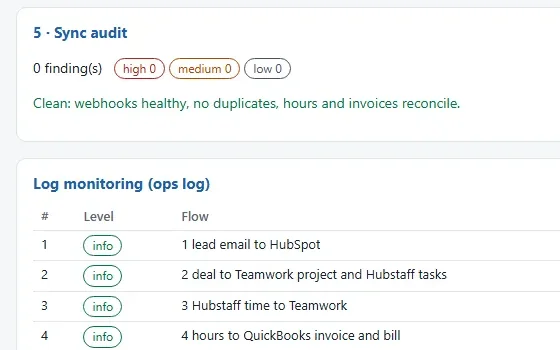
- Run a sync audit. A scheduled check that reads every connected tool and reports duplicates, broken webhooks and records that disagree. Ours reported 0 findings after the live run, and found the problems on the deliberately broken state.
What our demo tested, and what it did not
| Tested in our demo | Not tested |
|---|
| HubSpot | Live on a HubSpot demo account: 15 workflow executions on 2026-09-29, then the 4 records the test created were deleted and a read-back confirmed it | A real client account |
|---|
| Project tool, time tracker, accounting system | Mocks built from the vendors' public API documentation, run in the 8-scenario replay | Any real account of those tools |
|---|
| Retries and failure | One live run failed during a simulated accounting outage; the next run recovered and produced the draft invoice | A real outage |
|---|
| Hardened workflows | Passed the replay | Not re-run live. The recorded live run used the versions from before a later round of hardening |
|---|
| Trigger | The workflows ran in the replay and in the live runs | The inbox trigger was a stub, so no real email started a run |
|---|
Also not built: contractor payouts, revenue reporting, multiple currencies and tax. The accounting step makes drafts only.
What can go wrong
- The deal reaches Closed won twice. A deal reopened and won again can create a second project and invoice. Check for the saved ids first, and decide whether re-enrollment is allowed.
- The deal has no line items. The workflow has nothing to bill. Stop and tell a person, so that a blank invoice is not created.
- HubSpot's invoice action does not match your billing. Its documented draft path needs recurring line items. If you bill one-time amounts, plan on Route B or a manual conversion.
- A second n8n HubSpot trigger replaces the first. n8n's documentation says HubSpot allows one webhook at a time, so activating a second HubSpot Trigger stops the previous one. Keep one trigger and branch inside the workflow.
- Your plan does not include workflows. HubSpot's help page says workflows need a Professional or Enterprise subscription. Check before you design around them.
- An outside call fails halfway. Without retries and an error branch, you get a project and no invoice, and nobody notices. This is the failure our demo's outage run was built to find.
- Hours change after the invoice exists. Our demo flags a stale invoice when a workflow is re-run after the hours changed. It is a flag, not a repair.
- Two tools quietly disagree. This is why step 10 exists.
Sources
Read on 2026-11-15.
- HubSpot, understand and use projects (deal-based workflow, Closed won, Create record action, Professional or Enterprise requirement): https://knowledge.hubspot.com/records/understand-and-use-projects-object
- HubSpot, create invoices (Convert deal to invoice, Convert to invoice workflow action, recurring line items, draft invoice; page last updated October 28, 2026): https://knowledge.hubspot.com/invoices/create-invoices
- n8n, HubSpot Trigger node: https://docs.n8n.io/integrations/builtin/trigger-nodes/n8n-nodes-base.hubspottrigger/
- n8n, handle errors gracefully (error workflow, Error Trigger, Stop and Error): https://docs.n8n.io/flow-logic/error-handling/
- Our demo: Lead-to-invoice sync in n8n with a sync audit
Want this built for your own tools? Ask for a free automation audit.